Node filter
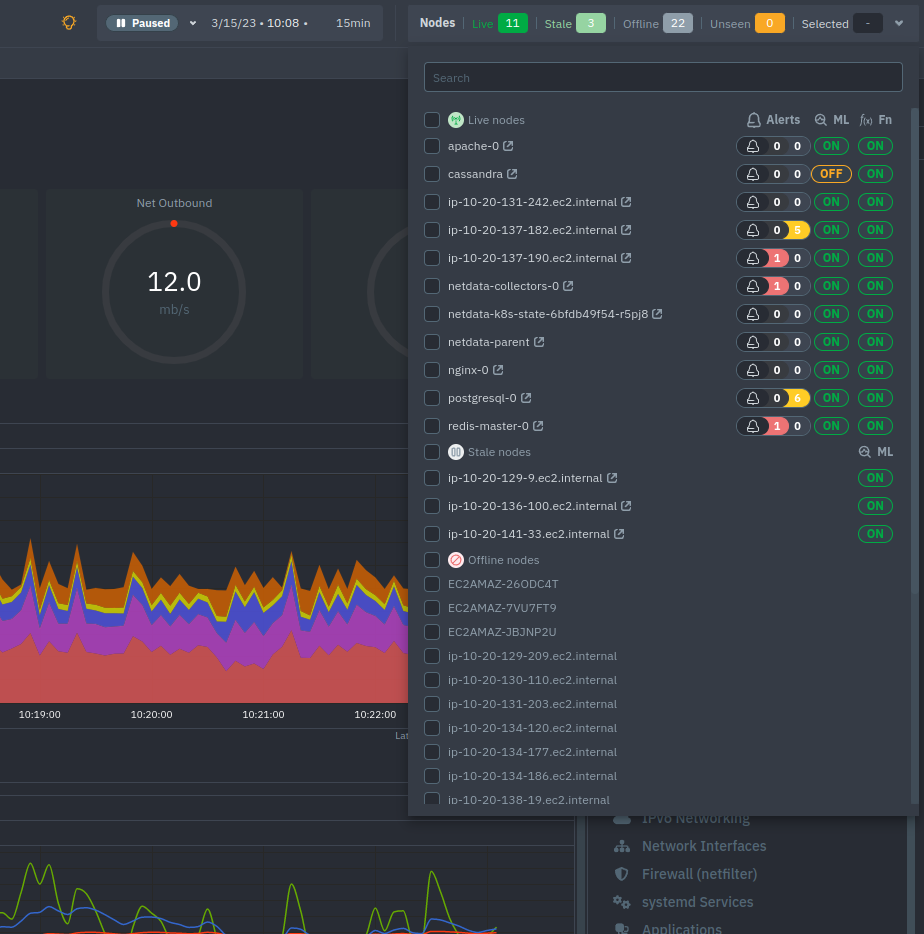
The node filter allows you to quickly filter the nodes visualized in a Room's views. It appears on all views, except on single-node dashboards.
Inside the filter, the nodes get categorized into three groups:
| Group | Description |
|---|---|
| Live | Nodes that are currently online, collecting and streaming metrics to Cloud. Live nodes display raised Alert counters, Machine Learning availability, and Functions availability |
| Stale | Child nodes that stopped streaming to their Parent, but the Parent is still online and has historical data available. For these nodes you can only see their ML status, as they are not online to provide more information |
| Offline | Nodes that are disconnected and have no data available in any Parent. Offline nodes are automatically deleted after a threshold period (7 days for standalone agents, 48 hours for child nodes) and can also be deleted manually. |
For a complete explanation of node states, transitions, and cleanup rules, see Node States and Transitions.
By using the search bar, you can narrow down to specific nodes based on their name.
When you select one or more nodes, the total selected number will appear in the Nodes bar on the Selected field.
Do you have any feedback for this page? If so, you can open a new issue on our netdata/learn repository.